Start with one useful video
An older upload can contain a clear answer that its title never mentions. A video called ‘Another Day in the Garage’ might cover a specific cold-start attempt, while its description begins with several lines of channel housekeeping. A refresh can make that subject easier to understand before someone clicks.
Choose a video that still offers something useful. Watch it again before editing. The goal is a more accurate invitation to watch, not a promise that a few new words will revive any upload.
- Write down the vehicle, product or topic actually covered.
- Identify the question answered and what viewers will see or learn.
- Note the limits: an inspection is different from a repair tutorial.
- Save the old metadata and a recent YouTube Analytics baseline, including impressions, click-through rate, views and viewing duration.
Choose keywords that fit the footage
Think about what someone would type to find this exact video. ‘Classic Mustang cold start’ identifies a more specific subject than ‘cars,’ but only belongs in the metadata if that is what the footage shows.
YouTube search suggestions can help you explore wording. They are not search-volume measurements, and a suggested phrase does not prove your video should target it. Start with the subject, then add the detail that makes this upload useful.
YouTube’s title guidance recommends accurate, concise wording and putting important words early. There is no universal display length: titles can be shortened differently across devices and surfaces. Preview the wording on a phone as well as a desktop.
Worked example: a classic-car garage video
Illustrative example only. This is not a customer story or a reported performance result.
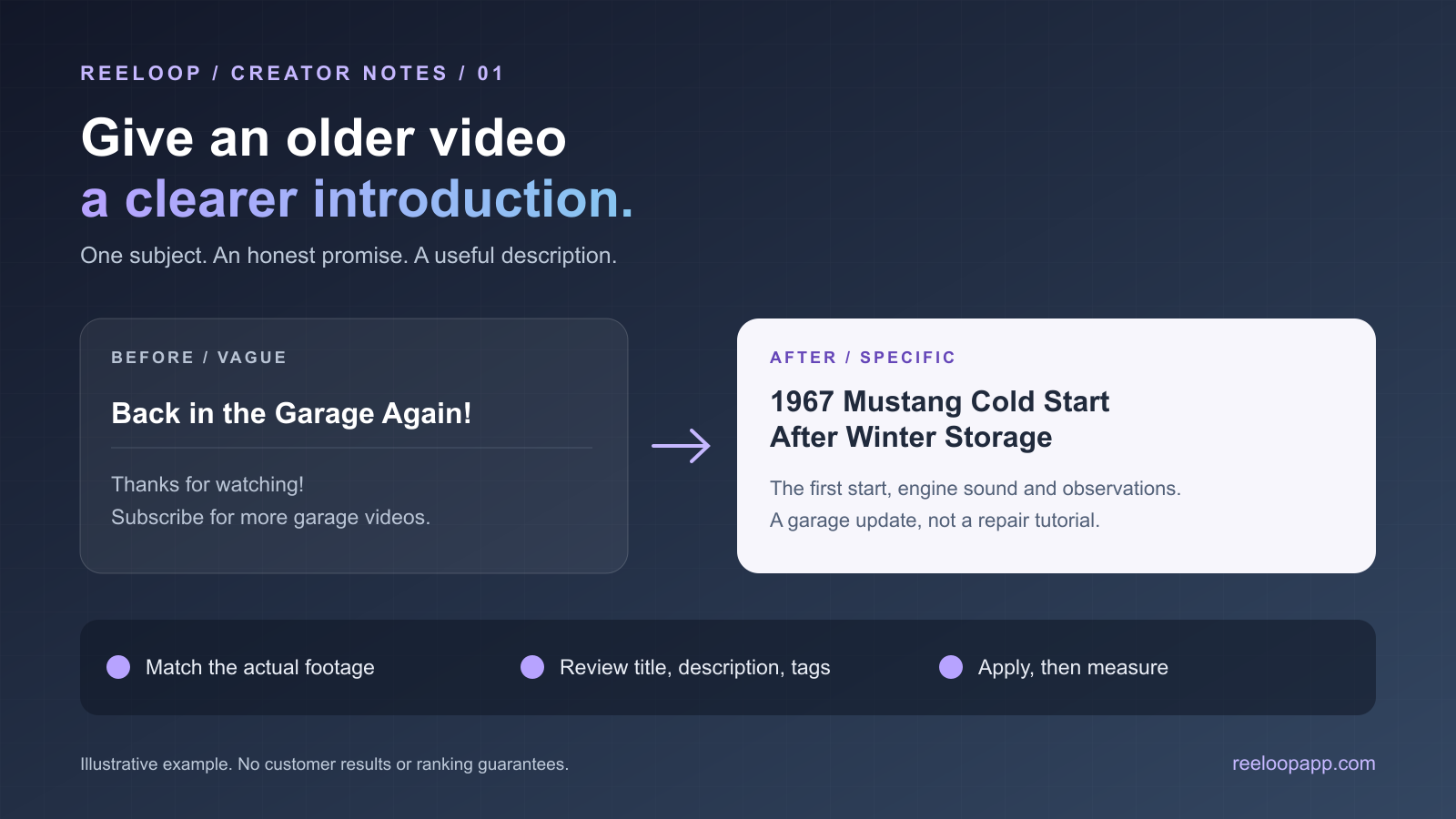
Imagine footage of a 1967 Mustang’s first cold-start attempt after winter storage. It includes engine sound and the owner’s observations, but no completed diagnostic procedure.
Original title: ‘Back in the Garage Again!’
Revised title: ‘1967 Mustang Cold Start After Winter Storage’
Original description: ‘Thanks for watching! Subscribe for more videos from the garage.’
Revised opening: ‘Watch this 1967 Mustang’s first cold-start attempt after winter storage, including the engine sound and our initial observations. This is a garage update, not a step-by-step diagnosis or repair tutorial.’
The revised wording identifies the car, situation and scope. It avoids ‘easy fix,’ ‘full restoration’ and ‘problem solved’ because the imagined footage supports none of those promises.
Keep useful credits and disclosures below the opening. Add a related playlist when it helps the viewer, and use chapters only after checking timestamps against the video. YouTube recommends a unique description and one or two main terms used naturally in the title and description.
Prepare and review the refresh in ReeLoop
Connect your YouTube channel in ReeLoop and choose the relevant existing video. Generate a metadata suggestion. ReeLoop combines keyword research and niche context with existing video information and can use available captions. Captions are not always accessible, so the draft still needs your knowledge of the footage.
- Compare the suggested title and description with your viewing notes. Correct years, model names, technical claims and implied outcomes.
- Remove unrelated search phrases and keep necessary credits, links and disclosures.
- Review the tags too. ReeLoop’s Apply action submits title, description and tags together. To preserve existing tags, make sure the reviewed list matches them.
- Review again after regenerating. Full regeneration replaces all three suggested fields, including manual edits to those suggestions.
- Apply the approved metadata, check the live YouTube page, and record the date and previous wording.
Spend less time on tags than on clarity
Keywords in a natural sentence help explain your subject. A long block of repeated tags in the description does not make that explanation better. YouTube says tags have a limited discovery role, with common misspellings being a useful case. Its guidance gives titles, thumbnails and descriptions more weight than tags.
Keep the title, opening description and thumbnail aligned with what viewers actually receive. That is a better review checklist than trying to fill every available character.
Measure the change without promising a win
Use comparable before-and-after periods. Two weeks on each side can be a practical starting point for your own review, not a platform rule; a low-traffic upload may need longer. Look at traffic sources as well as totals.
Review impressions, click-through rate and viewing behavior together. More clicks alongside shorter viewing duration deserves investigation. Audience mix, seasonality and competing uploads can change the numbers, so a before-and-after comparison is observational, not a controlled test.
Avoid rewriting the title repeatedly after small fluctuations. Keep a simple change log, allow enough data to accumulate, and make the next decision from the viewer’s experience rather than a ranking promise.
Frequently asked questions
Should I refresh every older YouTube video?
Start with a small set whose current packaging is incomplete or misleading. Leave accurate, useful wording alone unless you have a concrete reason to change it.
How many keywords should I put in a YouTube description?
Choose one or two main terms that describe the video, then use related wording naturally where it adds information. Explain the content rather than repeating a list of search phrases.
Will changing a YouTube title guarantee more views?
No. Clearer metadata can communicate the content more accurately, but audience interest, competing videos and the viewing experience still matter.
Does ReeLoop apply only the title and description?
No. Its Apply action submits the reviewed title, description and tags together. Check all three before applying.